We automate our lights, thermostats, vacuum cleaners, coffee machines and, apparently, refrigerators that can now judge us for running out of milk. So automated proctoring sounds like a perfectly natural development. Why have someone watch every minute of every online exam when technology can handle much of the work?
There is, however, a small detail anyone who has ever fought with a smart thermostat already knows: automation works well when it is configured well. The same applies to online assessment.
A good automated proctoring system needs to know what to monitor, which events matter, how much they matter, when to alert someone, and when a situation requires human judgment.
So, what is automated proctoring, how does automated proctoring work, and which parts of exam supervision are actually worth automating?
Automated proctoring is the use of proctoring software to supervise an online assessment without continuous monitoring by a human proctor.
Depending on the system and configuration, automated online proctoring can verify the test taker's identity, monitor their presence and environment, detect browser and device activity, record relevant events, warn the candidate when something needs correcting and generate evidence for assessment review.
You may also encounter the terms auto proctoring, automatic proctoring, automated test proctoring, autoproctor or simply an auto-proctored exam. The terminology varies; the underlying idea stays broadly the same: technology takes over tasks that would otherwise require continuous manual supervision.
And there are plenty of tasks worth handing over. Watching someone take a three-hour exam in which absolutely nothing happens is probably not the highest and best use of a human brain.
Automated proctoring starts before the first test taker opens the exam. Administrators first decide how the assessment should be proctored and configure the system accordingly. Once the assessment is set up, the process looks roughly like this:
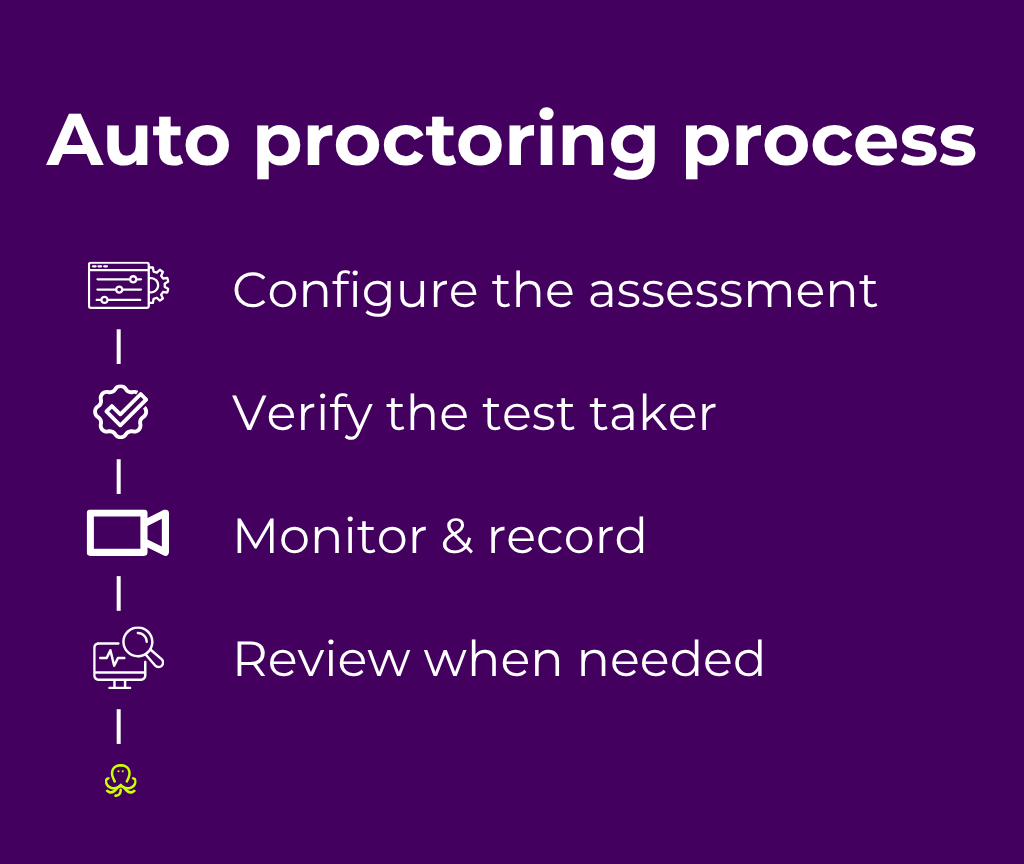
The details vary between automated proctoring systems, but these four stages explain the basic logic.
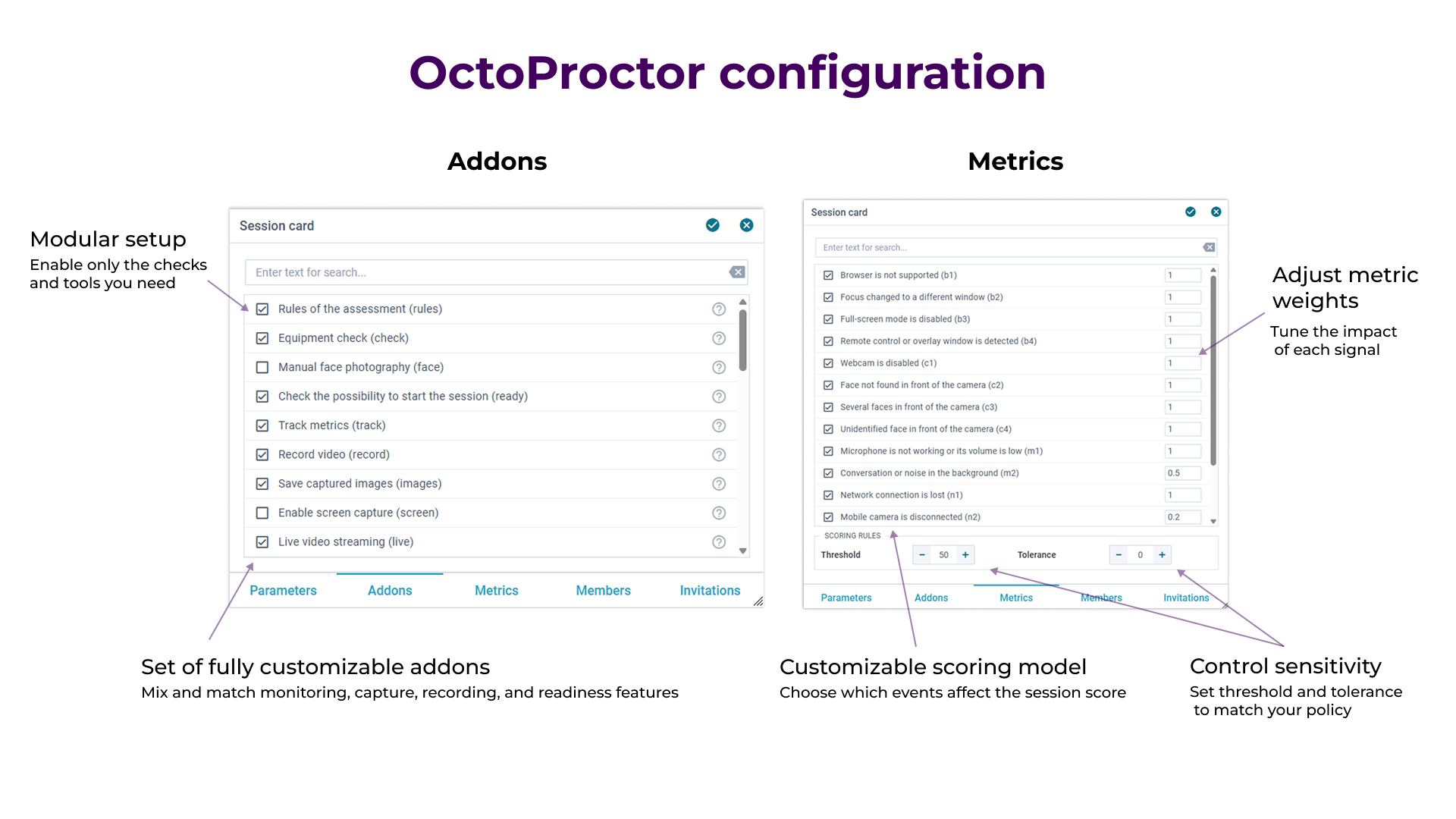
Let me be Captain Obvious: automation needs rules to follow. Before the assessment takes place, administrators decide what the automated proctoring system should monitor and how different events should be treated.
A language exam, a university final, a professional certification, and mandatory workplace safety training have different integrity requirements. Their proctoring settings should reflect that.
Depending on the assessment, administrators may configure:
For example, a brief network interruption and another person appearing beside the test taker provide very different signals. Configuration allows the system to treat them accordingly.
Think of a smart thermostat set to 30°C. It will maintain 30°C with admirable efficiency. The intelligence starts with choosing the right setting.
The same principle applies to auto proctoring: effective automation starts with thoughtful configuration.
Identity verification is one of the clearest candidates for automation. Manual remote identity checks can become surprisingly complicated. We've seen cases where test takers had to find workarounds just to show their ID clearly to a remote proctor. In one example, a test taker had to take a photo of their ID with their phone and then hold the phone up to the laptop webcam because the webcam could not focus clearly enough on the physical ID.
Yes, really.
There is friction on the other side of the camera, too. Online assessments increasingly cross borders, which means proctors may be asked to verify passports, national ID cards, residence permits, and other documents from countries they are unfamiliar with. Recognizing what a legitimate document should look like, where the relevant information appears, and which security features to check can become a challenge of its own.

The inconvenience is only part of the problem. Processes like this can disadvantage candidates depending on the devices they own, their language fluency, the type of ID they use, and how easily they can follow improvised technical instructions under exam pressure. Technical problems and misunderstandings can consume exam time and, in some cases, prevent candidates from proceeding.
An automated proctoring system can guide the candidate through ID capture, check the captured information, capture their face, perform the required identity comparison, and record the result according to the organization's verification requirements.
Organizations decide which identity checks are appropriate for a particular assessment and what should happen when an automated check produces an uncertain result.
Once the auto-proctored exam begins, the system monitors the signals enabled for that assessment and records relevant events as they happen.
This can include webcam and microphone activity, screen activity, browser behavior, connected devices, and the technical state of the session. Depending on the configuration, the system can monitor whether:
Some proctoring software can also protect assessment content by restricting certain browser actions or detecting attempts to interact with unauthorized applications.
As these events are detected, the system applies the rules configured before the assessment. Different events can contribute differently to the session result depending on factors such as their type, duration, configured weight, and tolerance.
Relevant evidence is recorded alongside them. Depending on the system and configuration, this may include video, audio, screenshots, browser activity, and technical records.
That context matters. A temporarily absent face is one signal. Knowing when it happened, how long it lasted, what happened around the same time, and whether other unusual events occurred gives reviewers considerably more useful information.
This is also where automated test proctoring earns its keep at scale. The same configured rules can be applied consistently across hundreds or thousands of sessions without requiring someone to continuously watch every candidate.
Not every session needs somebody to watch the recording afterward.
The system has already monitored the assessment, recorded relevant events, and applied the configured rules. Sessions that meet the organization's criteria can follow the normal workflow. Sessions requiring additional attention can be routed for human review.
A reviewer can focus on relevant events and supporting evidence instead of watching hours of uneventful footage and hoping something interesting eventually happens.
Human review can be particularly useful for ambiguous cases, unusual circumstances, appeals, or high-stakes assessments where additional judgment forms part of the organization's process.
That is one of the practical advantages of automated online proctoring: automation handles repetitive monitoring across every session, while people can focus their attention on cases where context and judgment add value.
And here’s the whole flow in action: the system does the monitoring and evidence collection, giving the proctor the information they need to make the final decision. You can also see what the test taker experiences along the way.
My rule of thumb is simple: give computers the repetitive work and give people the decisions that benefit from context.
Computers have one enormous advantage here: they do not get bored. Give a system 10,000 sessions and ask it to detect the same predefined event in every one of them, and repetition poses no particular problem. Ask a person to watch 10,000 mostly uneventful exam recordings with exactly the same level of attention, and we have a rather different experiment.
A smart thermostat set to 30°C is very efficiently doing what you told it to do. Automated proctoring works the same way.
The quality of the automation depends heavily on the rules behind it. Organizations should be able to configure questions such as:
The answers can differ even within the same organization.
A low-stakes quiz may need lightweight identity and participation monitoring. A professional certification exam may require stronger identity assurance, tighter browser controls and more extensive evidence. Both can use automated test proctoring, with very different configurations.
That is also why evaluating automated proctoring purely by counting how many things a system can "detect" misses much of the point. More detection can simply mean more noise when nobody has considered what those signals mean for the assessment.
The exact capabilities depend on the proctoring software, but monitoring generally falls into several groups.
The system can help verify that the expected candidate starts the assessment and remains present throughout it. This can include identity verification at the beginning, continuous presence monitoring during the exam, and additional identity checks when required.
Audio and video monitoring can provide evidence of conversations, unexpected noise, other people, or changes in the testing environment. Some assessments also use a secondary camera or room scan to provide a wider view of the candidate's workspace.
Room scans in particular have raised privacy concerns, including in the 2022 Cleveland State University case. We recommend using this level of environment monitoring only when the assessment genuinely requires it. For many exams, configurable identity, presence, browser, device, and activity monitoring can provide sufficient integrity controls while preserving more of the test taker's privacy.
Automated proctoring can monitor signals such as leaving the assessment window, stopping screen sharing, connecting an additional display, or attempting browser and device actions prohibited by the exam configuration.
More advanced browser security can also help protect assessment content and identify interactions with external applications or other tools that could provide unauthorized assistance.
A disconnected camera does not tell the same story as a second person appearing in the room, but reviewers still need to know that the recording was interrupted.
Automated monitoring can therefore track technical conditions such as webcam or microphone availability, screen sharing, network connection, and recording continuity.
Automation and artificial intelligence frequently appear in the same sentence, which has made the terminology unnecessarily fuzzy.
Automated proctoring is rule-based. Administrators define what the system should monitor, how different events should be treated, and which thresholds and tolerances apply. The system then follows these predefined rules consistently across assessment sessions.
AI proctoring uses AI models to analyze assessment data and identify patterns or events. This brings a different set of capabilities, configuration options, and considerations into the proctoring process.
This distinction becomes especially important when evaluating automated proctoring services. Ask what the system actually detects, how decisions are made, what evidence administrators receive and whether those decisions can be explained.
"Powered by AI" tells you considerably less about an assessment integrity system than you might hope.
Automated and live proctoring solve some of the same problems in different ways.
Automated proctoring works particularly well when organizations need scalability, consistent monitoring rules, asynchronous exam delivery and lower operational overhead. A candidate can take an assessment without requiring a human proctor to be available for the entire session.
Live proctoring provides immediate human observation and contextual judgment. A proctor can intervene during the session, communicate directly with the test taker and respond to unusual circumstances as they happen.
The appropriate approach depends on assessment stakes, candidate population, regulatory requirements, scale and the type of evidence the organization needs.
Hybrid workflows are also possible. Automation can monitor and collect evidence while humans concentrate on situations that genuinely require attention.
Automated online proctoring becomes particularly useful when continuous human supervision would create unnecessary cost or operational complexity. Common scenarios include:
For very high-stakes or tightly regulated assessments, organizations may choose stronger controls, human review or live supervision alongside automation.
Once you start comparing automated proctoring services, feature lists become long very quickly.
A more useful evaluation starts with questions:
You can also see how OctoProctor approaches automated proctoring, including configurable monitoring, identity verification, browser security, evidence collection and assessment reporting.
I have absolutely no desire to manually compare thousands of ID photos, watch thousands of hours of uneventful video or count how many seconds somebody looked away from their screen.
Computers are wonderfully patient at those things. Deciding what matters for a particular assessment, setting appropriate rules, interpreting ambiguity and handling exceptions still require thought.
Good auto proctoring makes that division of labor possible. Automation handles repetitive monitoring and organizes the evidence. People define the rules and can concentrate their attention where judgment genuinely adds value.
Your smart vacuum cleaner can clean the floor on its own. You still have to tell it where the stairs are.
OctoProctor lets you configure identity verification, monitoring rules, browser security, evidence collection, and review workflows around the exams you actually deliver.
Talk to usYes, some assessments can run fully automatically from identity verification through monitoring and session evaluation. Other assessment programs keep human review for uncertain results, high-risk events, appeals or particularly high-stakes exams.
The appropriate level of human involvement depends on the assessment and the organization's policies.
That depends on how the system has been configured.
A detected event can trigger a warning to the test taker, notify a proctor or administrator, contribute to a credibility score, appear as evidence in the session report, or send the session for manual review.
Detection alone should not automatically be treated as proof of misconduct. The type of event, duration, surrounding evidence and assessment rules all provide useful context.
Yes. Configurability is particularly important because different assessments carry different risks.
Organizations may configure identity requirements, monitoring rules, event severity, tolerance, candidate notifications, browser restrictions, recording requirements and review workflows according to the assessment.
It can be, provided the controls and workflows meet the requirements of the assessment.
For high-stakes use cases, organizations should pay particular attention to identity assurance, exam-content protection, evidence quality, system reliability, data protection, accessibility, review procedures and any applicable regulatory requirements. Human review or live intervention can also be added where appropriate.
A connectivity problem should be handled as a technical event and recorded accordingly. Depending on the automated proctoring system, the candidate may be able to reconnect and continue while the interruption remains visible in the session evidence.
This matters for both fairness and integrity: technical problems happen, and reviewers need enough information to understand what occurred.
Quite a lot. Systems vary in how they verify identity, monitor test takers, secure the browser, detect suspicious activity, calculate results, present evidence and involve human reviewers. Deployment, integrations, customization, accessibility and data-handling approaches can also differ considerably.
If you are comparing specific proctoring software, see our detailed comparisons of OctoProctor vs. Proctorio and OctoProctor vs. Honorlock.