AI-powered tools are changing the way people work, and unfortunately, the way some people attempt to cheat during online assessments.
Protecting exam integrity is no longer limited to webcams, microphones, or browser extensions. Today, institutions also need protection against browser-based cheating techniques that rely on keyboard shortcuts, operating system functionality, and external applications.
With OctoProctor v5.12.0, we continue strengthening browser-native security by expanding protection against unauthorized keyboard shortcuts, improving real-time intervention during assessments, and closing another browser-level bypass.
One of the remaining browser-level attack vectors involves keyboard shortcuts that can activate external applications or operating system functionality.
While previous versions already protected against the most common combinations, many applications, including AI-powered cheating tools, use their own shortcut combinations.
With this proctoring software update, OctoProctor now detects unauthorized key combinations instead of relying on a predefined list of common shortcuts. When detected, content locking activates immediately, helping protect exam content from unauthorized interactions with external applications and limiting access to assessment content.
Although some operating system–reserved shortcuts cannot be intercepted by browser applications, this additional protection significantly expands browser security for online exams while preserving the frictionless browser-based assessment experience.
The release also introduces a new evidence metric for suspicious keyboard shortcut activity.
Rather than interrupting the assessment, the metric records unauthorized keyboard shortcut usage in the session report, giving administrators additional evidence when reviewing potential policy violations.
This helps institutions investigate browser-based cheating attempts while avoiding unnecessary alerts during legitimate assessments.
Real-time notifications and post-exam evaluation serve different purposes, and they should behave differently too. OctoProctor v5.12.0 introduces dedicated notification logic that separates immediate intervention from post-exam credibility scoring.
Proctors are now notified whenever a violation is detected, giving them complete visibility into assessment activity as it happens. Test takers, on the other hand, receive notifications only when a violation persists for more than 10 seconds, helping them correct meaningful issues without creating unnecessary distractions during the assessment.
At the same time, credibility scoring remains focused on evaluating the assessment as a whole rather than driving real-time intervention.
The result is a more predictable monitoring experience, clearer reporting, and a better balance between automated monitoring and human decision-making.
Browser security is an ongoing process rather than a single feature. This release also adds detection for Chrome split-screen mode, helping institutions prevent side-by-side browser layouts from being used to access unauthorized materials during online assessments.
Together with recent improvements such as browser extension blocking, remote control and overlay detection, browser-based content protection, and unauthorized keyboard shortcut detection, OctoProctor continues to strengthen browser security for online exams without requiring dedicated lockdown browsers or additional software installations.
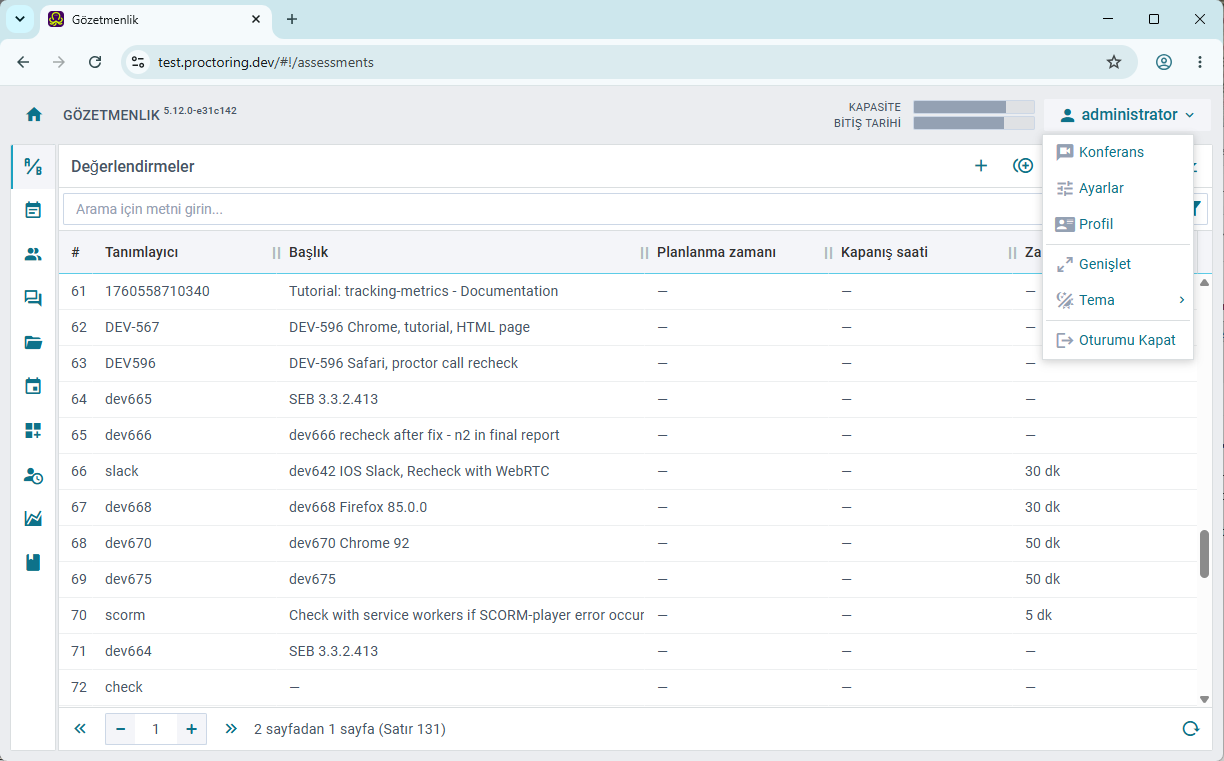
We've also updated Turkish localizations across the web application, backend services, and SDK, providing a more consistent and intuitive experience for Turkish-speaking administrators, instructors, proctors, and test takers.
From identity verification and system checks to assessment instructions and notifications, learners now encounter clearer, more natural Turkish throughout the assessment journey. Consistent terminology helps reduce confusion at every stage, allowing test takers to focus on the assessment rather than interpreting the interface.
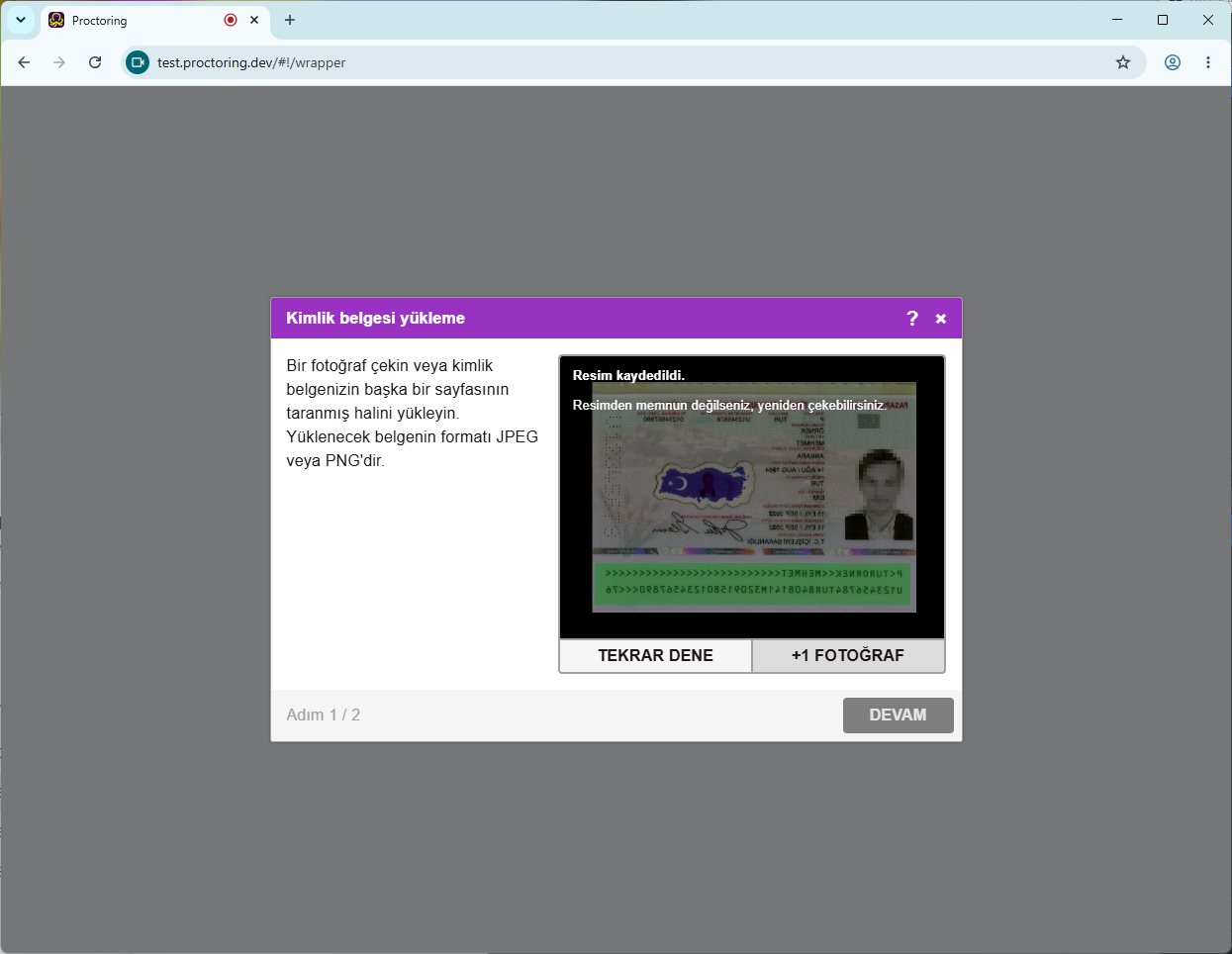
Localization improvements also extend to the administrative experience. Updated terminology across configuration screens, session management, reports, and platform settings makes everyday administration more intuitive for Turkish-speaking teams while improving consistency across the web application, backend services, and SDK.
Online assessment security is constantly evolving as new browser features, operating system capabilities, and AI-powered tools emerge.
Every release moves OctoProctor one step further toward protecting assessments without sacrificing usability.
By strengthening browser-native protection against browser-based cheating, improving real-time monitoring, and continuing to refine the assessment experience, this proctoring software update helps institutions deliver secure online exams with greater confidence while preserving a frictionless experience for administrators, instructors, and test takers.
As browser-based and AI-powered cheating techniques evolve, so should your assessment security. OctoProctor helps institutions protect exam integrity while preserving a frictionless experience for administrators and test takers.
Book a demoOctoProctor v5.12.0 expands browser-based exam security with unauthorized keyboard shortcut detection, introduces a new evidence metric for suspicious keyboard shortcut activity, improves real-time notifications, detects Chrome split-screen mode, and updates Turkish localizations across the platform.
OctoProctor detects unauthorized keyboard shortcuts commonly used to interact with external applications, including AI-powered cheating tools. When suspicious activity is detected, content locking activates immediately and the event is recorded for later review.
OctoProctor immediately activates content locking when unauthorized keyboard shortcuts are detected, helping protect exam content from unauthorized interactions. Some operating system–reserved screenshot mechanisms cannot be fully intercepted by browser applications, but related activity is recorded as evidence whenever applicable.
Proctors now receive notifications whenever a violation is detected, providing complete visibility into assessment activity. Test takers receive notifications only when a violation persists for more than 10 seconds, helping them correct meaningful issues without unnecessary interruptions.
Chrome split-screen detection closes another potential browser-level bypass by helping prevent test takers from viewing unauthorized materials alongside an assessment. It complements OctoProctor's existing browser-native security features without requiring additional software or lockdown browsers.


Admin-facing accessibility prevents avoidable operational errors and reduces fatigue while keeping your workforce diverse. Choosing a proctoring software that meets WCAG AA and features improved assistive-tech compatibility is crucial, but real accessibility also depends on how your team runs exams day to day.