One of the biggest challenges in online proctoring is balancing security with usability. Traditional lockdown browser solutions require downloads, installations, and device-level restrictions that create friction for both test takers and administrators.
Over the past two releases, we’ve been bringing lockdown browser-level protections into standard browsers, without forcing users to install additional software. With OctoProctor v5.10.0, we can finally say that this foundational mission is complete.
Today, OctoProctor delivers the core protection mechanisms traditionally associated with lockdown browsers directly inside the browser itself, combining strong exam integrity with a frictionless user experience.
Our proctoring platform now detects suspicious remote-control behavior and screen overlays during online assessments.
The new detection logic identifies:
These methods are often associated with advanced cheating attempts or unauthorized remote assistance.
By detecting them automatically during the exam session, institutions gain stronger exam integrity protection without requiring Safe Exam Browser, LockDown Browser, or other intrusive lockdown browser solutions.
The result: stronger security with a frictionless browser-based experience for test takers.
Not every organization needs full video recording for every assessment or training workflow. Some environments require a lighter approach focused on attendance verification, identity confirmation, and operational simplicity. And that’s where the new image-based workflows in OctoProctor v5.10.0 come in.
The new Images add-on allows institutions to collect periodic webcam, screen, and mobile snapshots without recording full video streams.
This approach significantly reduces:
At the same time, organizations still retain visual evidence of participation throughout the session.
Combined with ID verification, snapshot-based monitoring helps ensure the person attending the training or assessment is the person who was actually assigned to it.
This is especially valuable for compliance-required learning programs (such as alcohol server certification) and attendance-sensitive online trainings (such as safety trainings).
For many organizations, this creates a practical middle ground between no monitoring at all and full behavioral video proctoring.
We’ve also introduced more flexible automated evaluation logic for lightweight proctoring workflows.
Instead of forcing borderline sessions into binary positive or negative outcomes, OctoProctor can now automatically flag uncertain sessions for manual review.
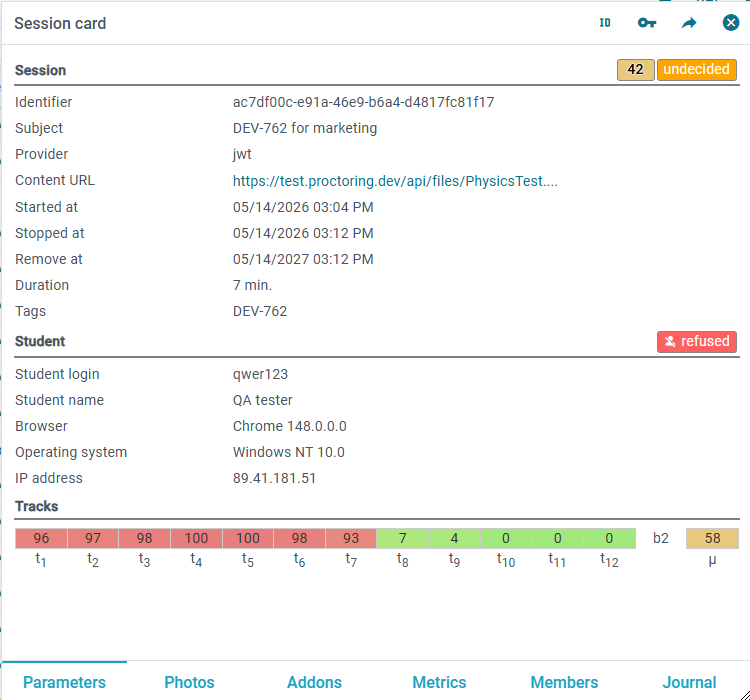
Test organizers can also configure tolerance levels themselves, defining how strict or flexible automated conclusions should be depending on the assessment type, risk level, or compliance requirements.

OctoProctor online proctoring platform showing configurable tolerance settings for automated exam session conclusions, allowing institutions to adjust sensitivity levels for secure and flexible online assessments.
This helps institutions reduce false positives, improve operational fairness, and focus reviewer attention where human judgment is actually needed.
OctoProctor v5.10.0 also introduces improvements that simplify proctoring workflows for LTI-based LMS thus making our proctoring platform easier to operate for diverse administrative teams.
Instructors can now add OctoProctor activities directly from their LMS without involving IT departments. requiring any IT department involvement.
With LTI 1.3 Deep Linking:
This reduces setup complexity, eliminates LMS-specific workarounds, and accelerates deployment of proctored assessments across Moodle and other LTI-compatible systems.
Accessibility remains an important part of building inclusive online assessment experiences, and it’s something we’ve been improving continuously across recent releases (with more enhancements already planned ahead).
This release further improves keyboard navigation visibility, now enhanced with focus indicators, and screen reader navigation workflows. This all results in faster page navigation for assistive technology users. These updates help institutions support WCAG accessibility standards while making OctoProctor easier and more comfortable to operate during daily administrative work.
We also introduced several platform-level improvements designed to make OctoProctor more scalable, reliable, and easier to manage.
Enhanced metrics control and feature-based licensing capabilities now allow institutions to configure enabled functionality more precisely across customer environments and operational tiers.
This release introduces the first stage of feature-based white-label configuration management. New licenses without white-label enabled now display OctoProctor branding references across administrator and test-taker interfaces, while existing deployments remain unaffected.
We improved long-term platform reliability through:
Together, these improvements help ensure smoother online assessments and more predictable platform behavior across different environments.
At OctoProctor, we believe secure online assessments should not depend on intrusive software, complicated setup flows, or unnecessary operational overhead.
With every release, we continue moving toward a proctoring platform that combines strong exam integrity, accessibility, flexibility, and usability directly in the browser. OctoProctor v5.10.0 is another step in that direction. Whether you’re delivering high-stakes certification exams, attendance-sensitive compliance trainings, or scalable LMS-based assessments, OctoProctor continues evolving to support modern online proctoring workflows without sacrificing user experience.
Schedule a product walkthrough with our team and explore the latest proctoring software improvements, lightweight monitoring workflows, and browser-based exam protection features.
Book a demo

Highlighting how OctoProctor’s latest proctoring update strengthens safe exam protection, improves administrator accessibility, and enhances reliability across the proctoring platform. All while preserving the simplicity of fully browser-based online proctoring.